

This episode releases on the week of Thanksgiving, which is also a big time for holiday deals and making purchases for your photography business – so I have a recommendations. This chat is a short and sweet touchpoint to share the Big 4 in my business – aka, the four software tools that are essential for keeping things running smoothly. This powerful combo is the nuts and bolts of my marketing, sales, communication and delivery – the tech stack of dreams.
If you’re thinking of upleveling your tooling or getting started with some client experience systems to scale your work, listen for the tools that are my top four photography business recommendations – what each tool does, why I chose it, how they connect to one another, and what to consider most if you’re shopping for smarter systems this season.
Why a Photography Tech Stack Matters
Photographers don’t need dozens of apps—they need the right few. With a strong, connected ecosystem, you can:
- streamline your photography workflow,
- improve your client experience,
- save hours of back-and-forth communication,
- automate parts of your marketing, and
- make more sales with less friction.
My goal has always been a business that feels simple, sustainable, and human. These four tools help me do exactly that.
The Big 4 Tools I Use in My Photography Business
1. HoneyBook — My Client Management System (CRM)
Category: CRM + client communication
If you’ve ever felt scattered across email threads, Google Docs, phone reminders, and mental checklists, HoneyBook is the system that brings it all together. It manages inquiries, bookings, contracts, payments, questionnaires, and communication—all in one place.
Why it’s essential:
- Automated workflows help you create a seamless client experience. Even if it needs adjusted and personalized from client to client, the system itself keeps you from forgetting to send people what they need in a timely manner and helps you keep it all organized in one place.
- Faster booking with pre-set proposals and a streamlined way for people to complete it all
- Clean, organized communication in a single inbox
- Every project tracked from inquiry to final delivery
HoneyBook is the heart of my backend system and for me, feels completely essential.
TRY HONEYBOOK: https://share.honeybook.com/leah9738526
2. Pic-Time — Client Galleries & Product Sales Income
Category: Gallery delivery + online store
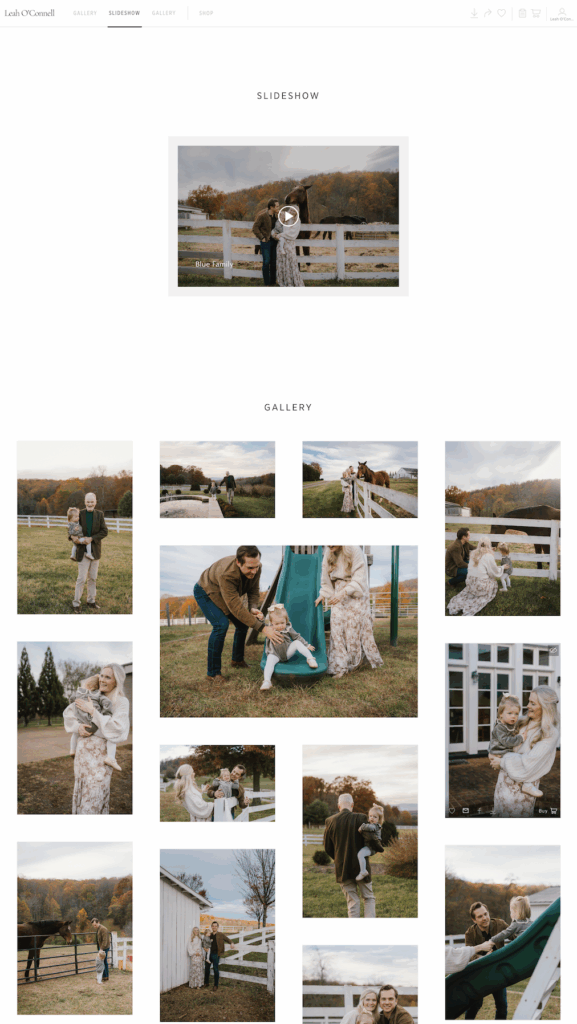
Pic-Time is where my client work lives after a session. I can connect the gallery to Honeybook as well so literally everything related to that client is accessible in one place. As a gallery delivery platform, this is how my clients experience their final product, so the professionalism, style, and ease of the platform navigation is crucial. I love that I can include slideshows right in the gallery as well to really elevate the viewing experience.
After viewing, clients have a killer storefront they can browse and see their images within all the products. This really incentivizes ordering and I’ve seen a pretty significant shift in how my clients use their print credit and my ability to be more hands-off with it as well.
Why I recommend it:
- Beautiful, easy-to-navigate client galleries
- Built-in sales tools that increase print and album purchases
- Clean design that fits beautifully with an all inclusive brand while still feeling very personalized
It’s a delivery tool and a quiet powerhouse for post-delivery sales.
TRY PICTIME: https://leahoconnell.pic-time.com/referral

3. Flodesk — Email Marketing & Client Relationship Building
Category: Email marketing
Flodesk is my ride or die for email marketing because it’s simple, visually appealing, and soooo simple to use compared with other platforms I’ve tried. It allows me to build and stay connected with my community in a meaningful, consistent way. Because of Flodesk, a vast majority of my clients come from email, which keeps me from living on social media and helps me create marketing that feels more intentional and personal.
How it supports my business:
- Automated email sequences for new inquiries and subscribers
- Consistent layouts for brand recognition
- Simple audience segmentation
- Perfect for launches, updates, and seasonal messaging
TRY FLODESK: https://flodesk.com/c/PHOTOFUEL
4. Showit — The Backend Design to my Website / Online Home
Category: Website builder
Showit is the visual front door to my brand. It’s where clients land, learn about, and decide if they want to work. The creative freedom of the drag-and-drop interface allows me to tweak already-amazing templates for a site that feels natural, warm, and true to the environment I want to invite people into.
Why I love it:
- Unlimited creative control for both desktop and mobile
- Drag-and-drop interface
- Seamless blogging with WordPress
- Integrated tooling to support high-level SEO
TRY SHOWIT: https://showit.com/r/jt922s
How These Tools Work Together
The thing that makes these four platforms powerful isn’t just what they do individually—it’s how they support each step of the client journey:
- Showit is the online home that attracts people and brings them closer (via Honeybook contact forms & Flodesk embedded opt-in forms)
- HoneyBook manages inquiries, booking, communication, and workflows
- Flodesk nurtures long-term connection and marketing
- Pic-Time delivers final galleries and drives print sales
How to Choose the Right Tools for Your Photography Business
Before you dive into purchasing or buy something on a holiday sale just because it’s on sale, ask yourself:
- What are problems I’m facing?
- Which of these tools would help me solve that problem most quickly?
- What could I let go of with the use of this tool?
- Do I have the time and energy (or am I willing to make it) to integrate this new tool?
Your tech stack should support your creativity, not complicate it.
BOTTOM LINE:
You don’t need every new platform or tool under the sun. But choosing the right stack and thinking long-term about quality can transform the way your business feels and grows on a regular basis.
If you’re evaluating upgrades or building your first foundational systems, check out the tools linked in this episode and reach out if you have any follow-up questions via instagram or email – I’m always happy to talk business!
// LINKS MENTIONED //
Episode: 25: Navigating Black Friday for family photographers
Episode 31 : Your Black Friday Investment Plan
Episode 46: Why I switched to Honeybook and how it’s going: (on spotify)
(on apple podcasts)
Honeybook referral link: https://share.honeybook.com/leah9738526
Pictime referral link: https://leahoconnell.pic-time.com/referral
Flodesk referral link: https://flodesk.com/c/PHOTOFUEL
Showit referral link: https://showit.com/r/jt922s
The Photo Fuel Retreat & Mastermind: https://www.leahoconnell.com/retreat